Your Database Can Scale Further Than You Think
Before you reach for a cache, read replicas, or a second database, a single well-tuned Postgres instance scales much further than people expect. Here is the order to actually fix things in.
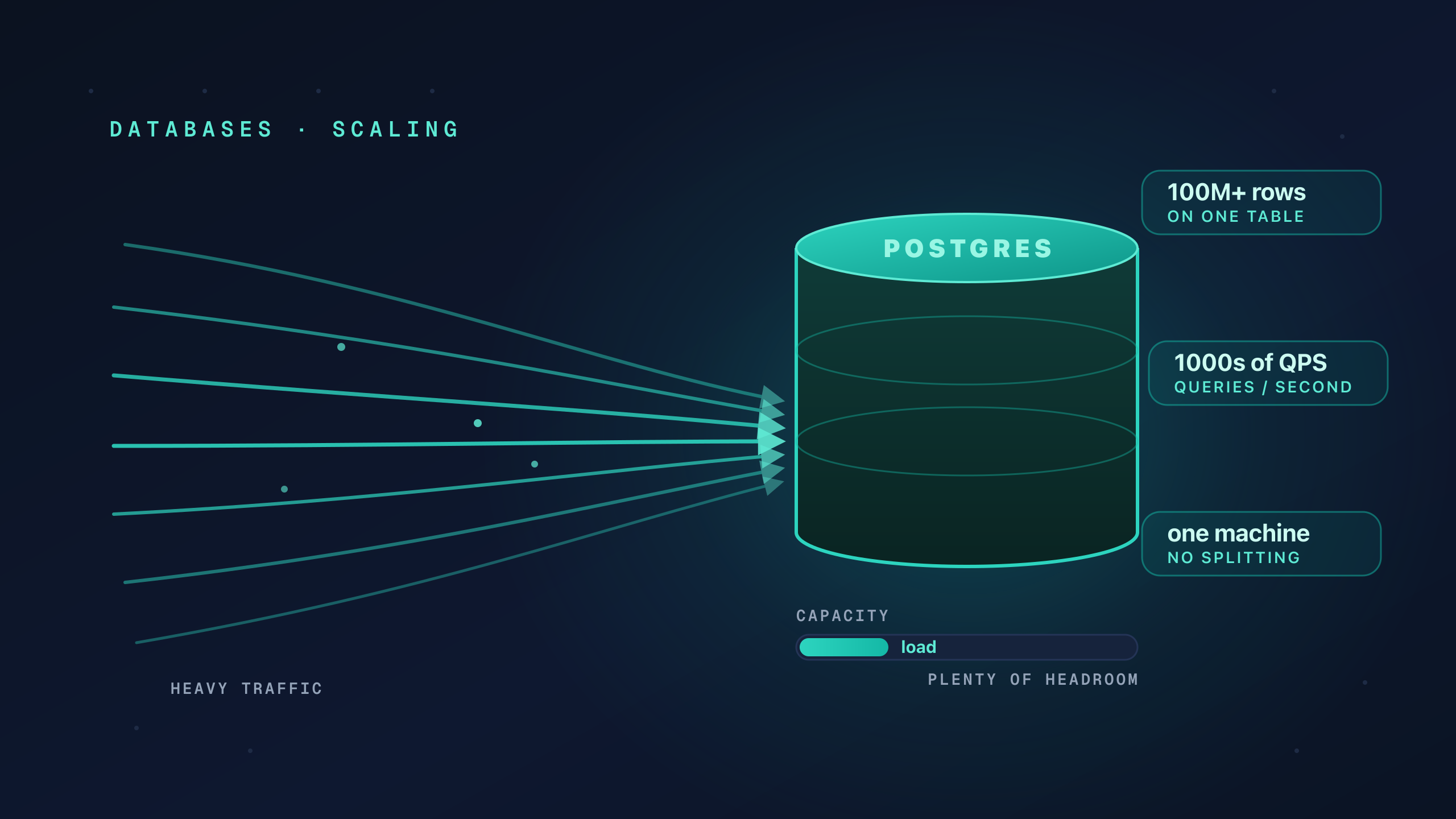
The moment an app feels slow, the instinct is to assume the database has run out of room. People start talking about splitting the data, adding a cache, or moving reads onto replicas before anyone has checked what is actually happening.
Most of the time the database is nowhere near its limit. One query is doing far too much work, and a single well-tuned instance can serve a serious amount of traffic on hardware you already pay for. A modern server running Postgres can hold tables with hundreds of millions of rows and answer thousands of queries per second, as long as the queries are shaped well and the indexes exist.
The problem is that “scale the database” is exciting and “add the right index” is boring. So people skip the boring fix and jump to the expensive one.
Fix Things in the Right Order
Almost every scaling problem has a cheap fix and an expensive fix, and the cheap one usually wins. The trick is to climb the ladder from the bottom, not the top. Each rung up costs more money, more moving parts, and more ways to fail.
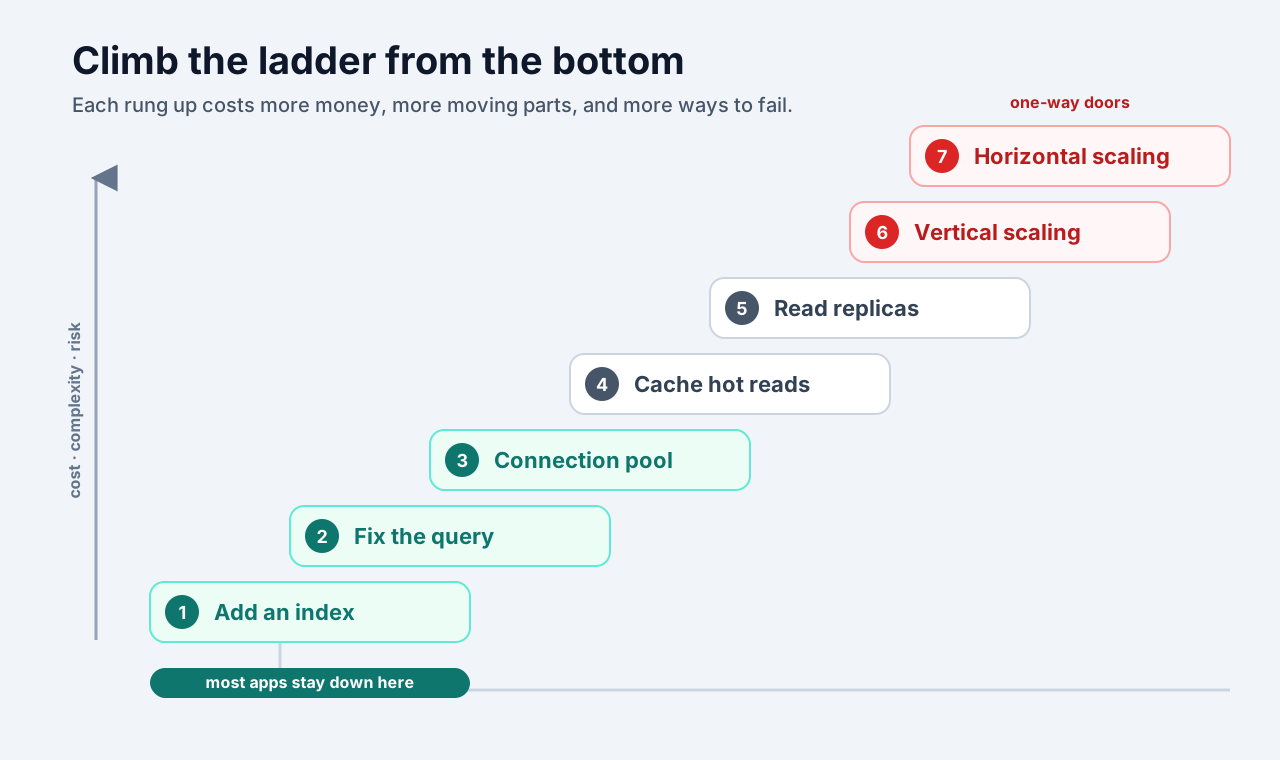
The lower rungs are reversible. You can add an index today and drop it tomorrow and nothing else in your system has to know. The top rungs are one-way doors: once your data is split across machines, every query, migration, and backup has to respect that split forever.
Start at the bottom. Measure. Only climb when the rung below has genuinely run out.
Slow Is Usually One Query, Not the Whole Database
When a page is slow, the database as a whole is rarely the bottleneck. One specific query is reading more rows than it needs to, running on every request, or being called in a loop.
So before you change any infrastructure, find the slow query. Postgres can tell you exactly what it is doing with EXPLAIN ANALYZE:
EXPLAIN ANALYZE
SELECT * FROM orders WHERE user_id = 456;
If the plan says Seq Scan, the database is reading every single row in the table to find the ones you asked for. On a small table that is fine. On a large one it is the whole problem.
Index It Before You Scale It
An index is a separate, sorted structure that lets the database jump straight to the rows you want instead of scanning the entire table. It is the single highest-leverage change you can make, and it is almost always the thing missing when a query is slow.
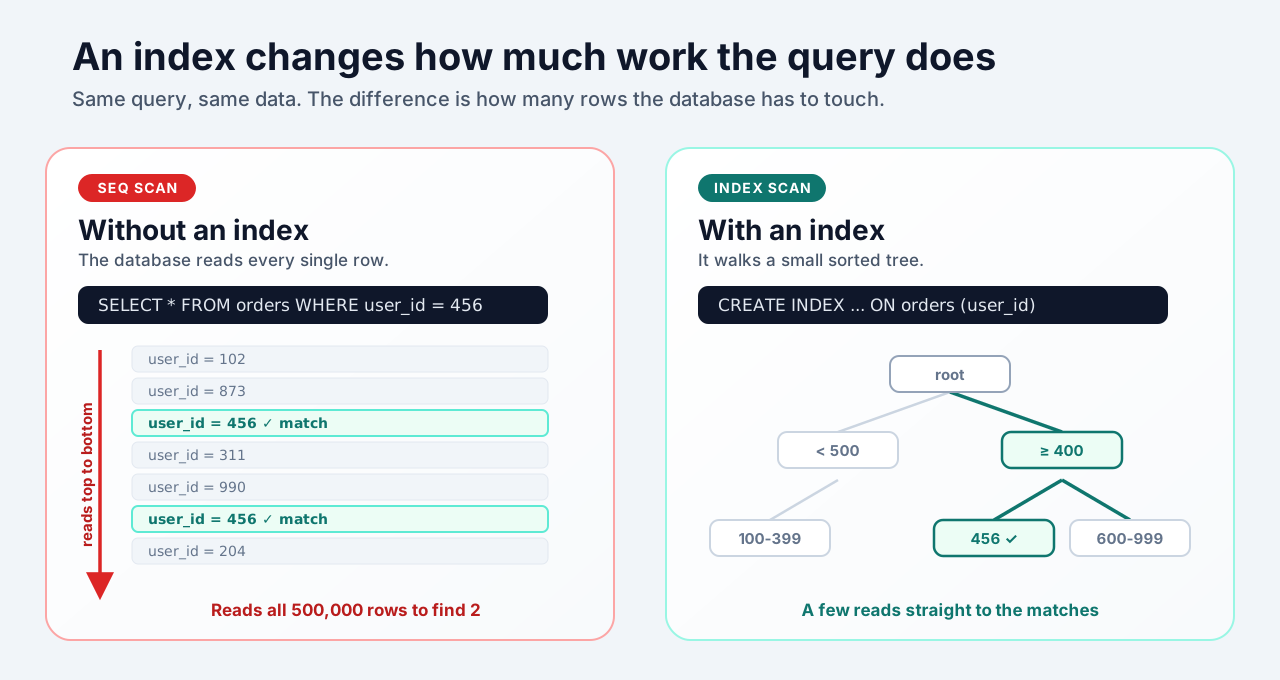
Without an index, finding one user’s orders in a table of five hundred thousand rows means reading all five hundred thousand. With an index on user_id, the database walks a small tree and reads only the handful of rows that match:
CREATE INDEX idx_orders_user_id ON orders (user_id);That one line can turn a query that takes half a second into one that takes well under a millisecond. No new servers, no new services, no data split apart. Index the columns you filter, join, and sort on, and a surprising number of “we need to scale” problems quietly disappear.
A word of caution: indexes are not free. Each one takes disk space and makes writes slightly slower, because every insert and update has to keep the index current. Add the indexes your queries actually use, not one on every column.
Mind Your Connections
Here is a failure that looks exactly like “the database is overloaded” but is not. Every connection to Postgres is backed by its own server-side process that holds memory. A few hundred of them is usually the practical ceiling. If every request opens its own direct connection, a traffic spike opens thousands of connections, and the database spends its time managing processes instead of answering queries.
The fix is a connection pool. A small, fixed set of connections is shared by every request. Thousands of clients take turns using a few dozen connections, and the database stays calm.
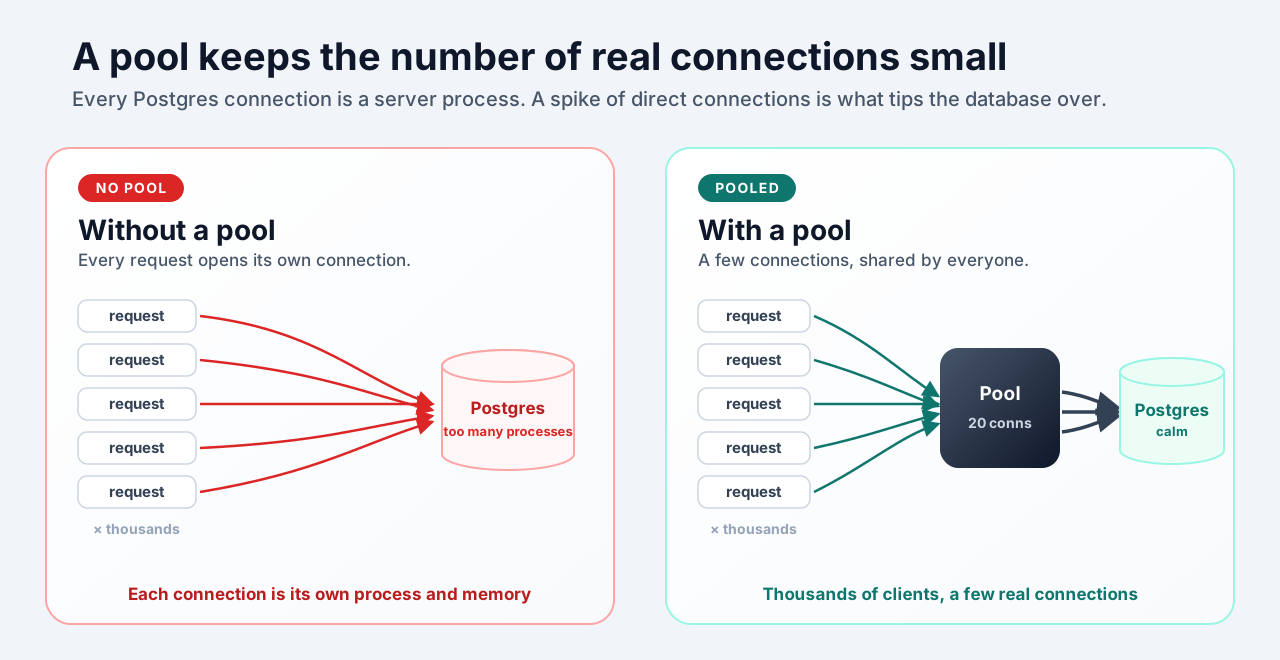
A pooler like PgBouncer, or the pool built into your framework, sits between the app and the database and hands out connections from a fixed set. The point is not the specific tool. It is that the number of real database connections should be small and bounded, no matter how much traffic you get.
Read Replicas Before You Split the Data
Most applications read far more than they write. People load pages, scroll feeds, and open dashboards constantly, but write much less often. If your single database is genuinely busy and it is busy with reads, you do not need to split your data. You need more copies of it to read from.
A read replica is a full copy of the database that stays in sync with the primary. All writes still go to one primary, and reads are spread across the replicas.
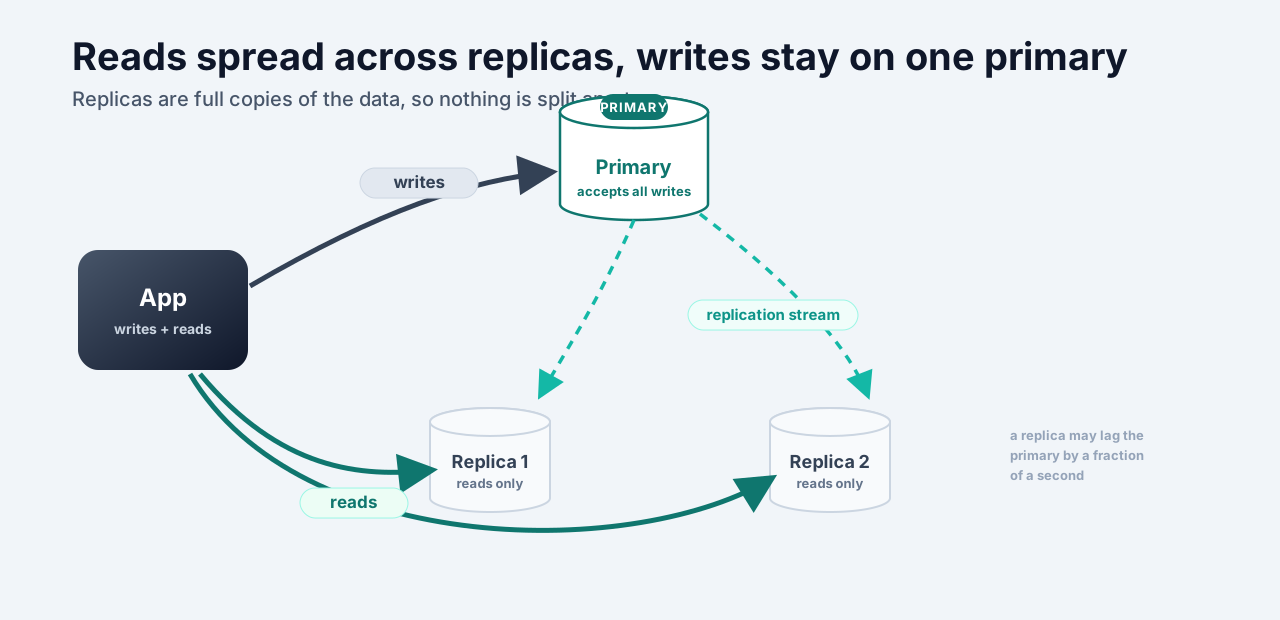
This scales reads without the pain of splitting your data, because the data is not actually divided. Every replica has everything. The one cost to understand is replication lag: a replica can be a fraction of a second behind the primary, so just after a write, a read from a replica might return slightly stale data. For most reads that is completely fine. For the few that must be current, send them to the primary.
A Cache Is a Promise You Have to Keep
Caching feels like the obvious answer: keep hot results in memory and skip the database entirely. It is powerful, but it is not the free win it looks like. A cache is a second copy of your data, and now you are responsible for keeping two copies honest.
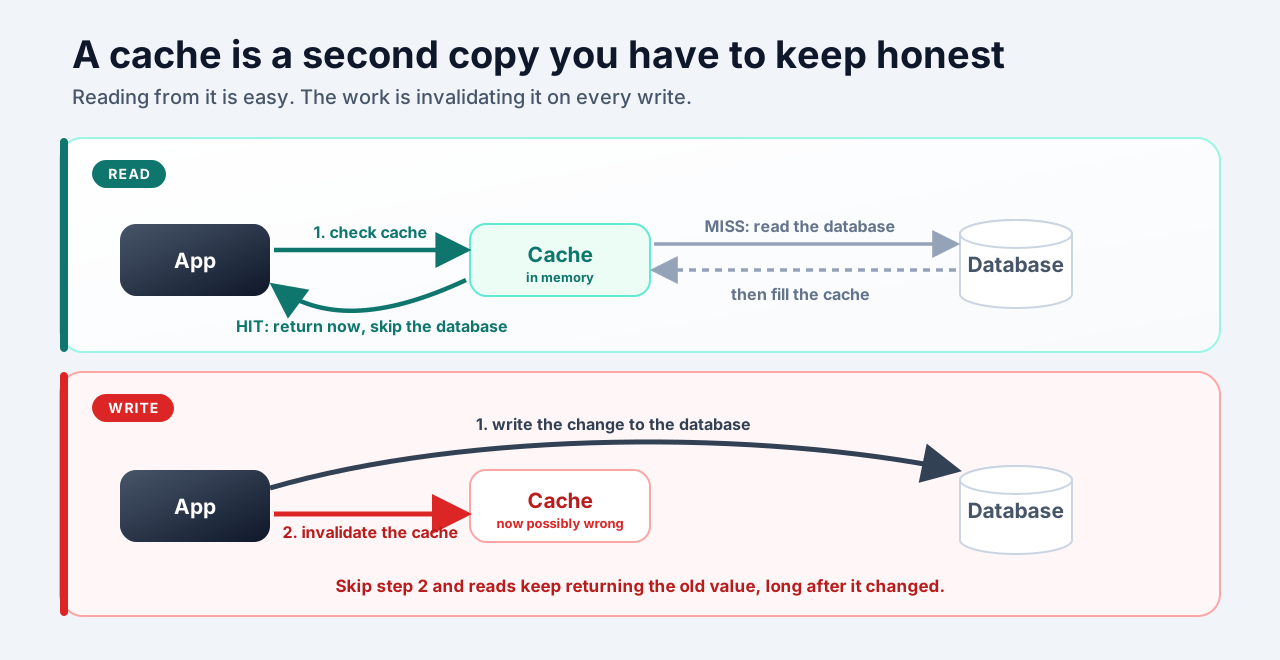
The read path is simple: check the cache, and on a hit, return without touching the database. The trouble is the write path. Every time the underlying data changes, the cached copy has to be updated or thrown away. Forget that in one place and you start serving stale data: a price that already changed, a profile that was already edited, a balance that is already wrong.
That is the real cost of a cache. Not the memory, but the discipline of invalidating it correctly. Reach for it once the cheaper fixes are in place and you have a specific, hot, read-heavy path that is worth the extra bookkeeping.
When One Machine Is Not Enough
Sometimes you really do outgrow a single machine. There are only two ways to go from here, and they are the last two rungs of the ladder.
Scaling vertically means moving the database to a more powerful machine: more CPU, more memory, faster disk. Nothing about your data or queries changes, which is why it is the simpler of the two. Modern machines are large, so this alone buys a long runway.
Scaling horizontally means splitting the data across several machines, so each one holds only a slice of it. This is the one people call sharding, and it is the most expensive rung for a reason: you lose easy joins and single transactions, every query has to know which machine to ask, and backups, migrations, and rebalancing all get harder. It is a one-way door.
Reach for horizontal scaling only when the signs are concrete:
- Writes, not reads, are the bottleneck, so replicas do not help.
- A single table is so large that even indexed queries on a powerful machine cannot keep up.
- You have hit a hard limit of one machine, like disk size or write throughput, with the cheaper rungs already used.
Notice how far down the list that is. By the time you genuinely need to split your data, you should already have the right indexes, a connection pool, replicas for reads, and a cache on the hottest paths.
Most products never get there. They just needed an index.
Final Mental Model
A database is not a fragile thing that tips over the moment you get real traffic. It is a well-engineered machine that does an enormous amount of work on modest hardware, as long as you let it.
When something is slow, resist the urge to add a new system. Instead, climb the ladder in order:
- Find the slow query with
EXPLAIN ANALYZE. - Add the index it is missing.
- Put a connection pool in front of the database.
- Move reads onto replicas if reads are the load.
- Cache the few hot paths that are worth the bookkeeping.
- Only then scale vertically with a more powerful machine, and only after that, scale horizontally by splitting the data.
Your database can scale further than you think. Most of the time, the work is not making it bigger. It is getting out of its way.