You Probably Don't Need WebSockets
Server-Sent Events are often enough for live feeds, notifications, progress updates, AI streaming, dashboards, and other server-to-browser realtime features without building WebSocket infrastructure.
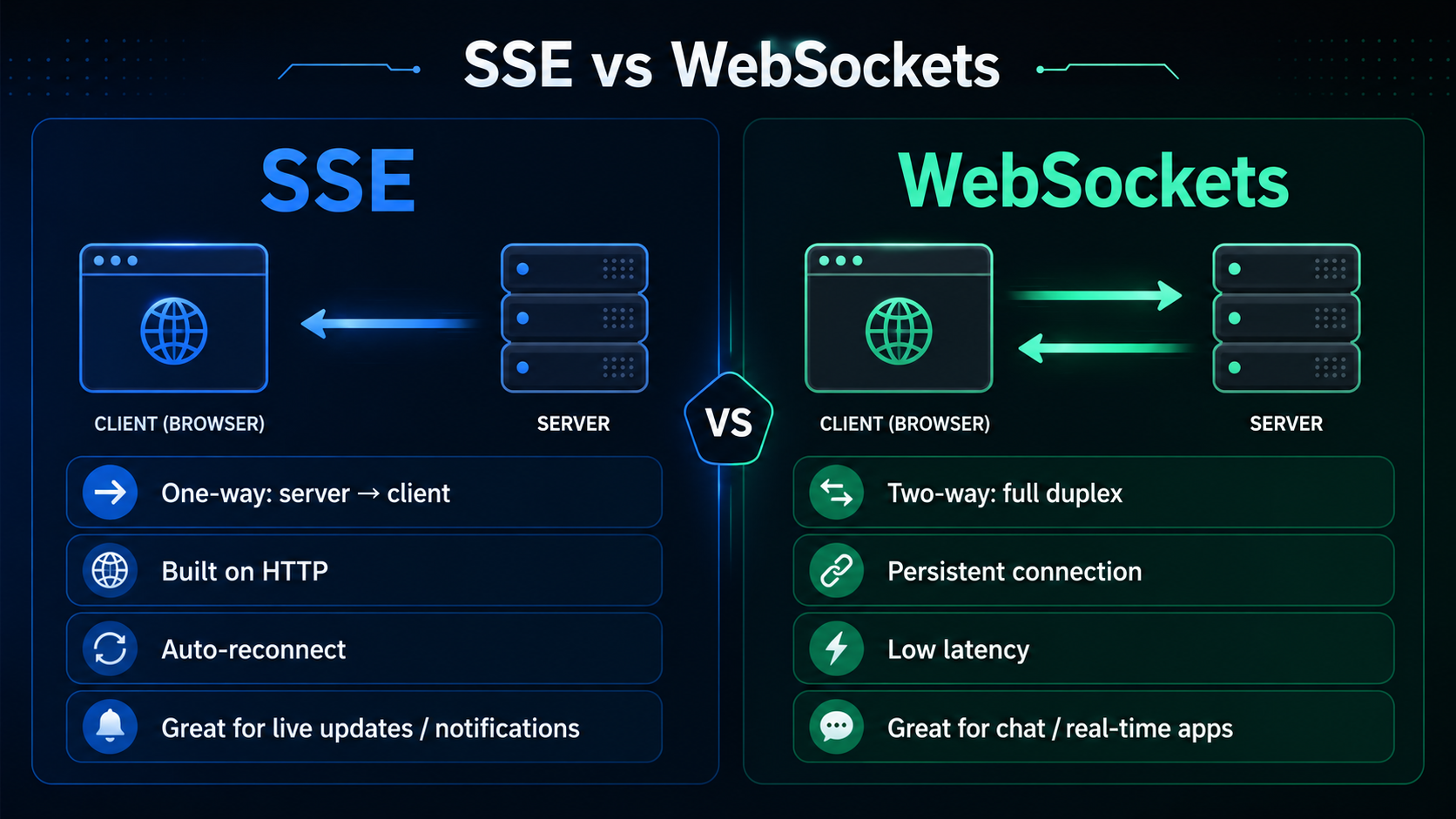
Most realtime features on the web are not actually bidirectional.
They feel realtime because the browser updates without a refresh: a new notification appears, a job progress bar moves, a dashboard metric changes, an AI answer streams token by token, or a message shows up in a feed. But in many of those cases the browser is not constantly talking back over the same live channel. The browser mostly waits. The server sends updates when something changes.
That is the exact shape Server-Sent Events were built for.
WebSockets are useful, but they are also easy to reach for too early. Once you choose them, you usually take ownership of a custom message protocol, connection lifecycle, reconnect behavior, heartbeats, load-balancer behavior, horizontal fan-out, observability, and failure handling. Sometimes that is the correct trade-off. A collaborative editor, multiplayer game, terminal session, or low-latency two-way control surface probably wants WebSockets.
But a lot of product work does not.
If your feature is “the server needs to push updates to the browser,” you probably want SSE first.
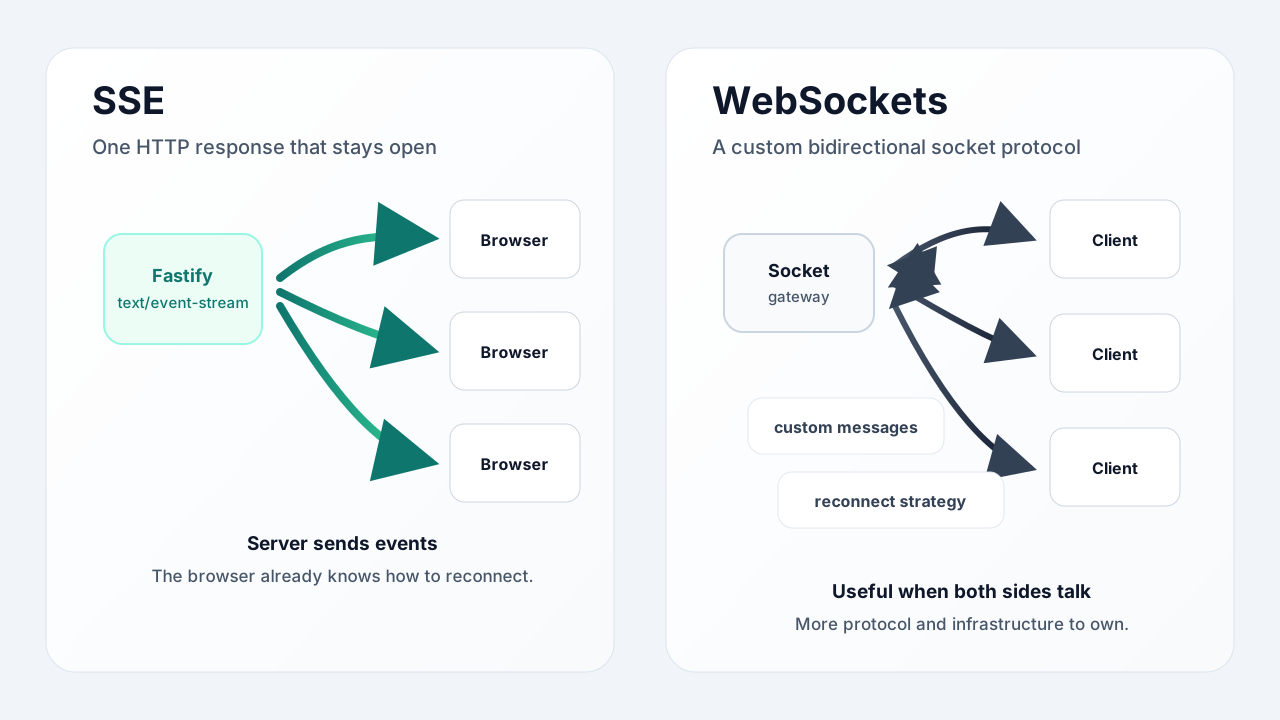
The Mental Model
SSE is simple because it keeps HTTP in the center.
The browser opens a normal GET request:
const source = new EventSource("http://localhost:4000/messages/events");The server responds with Content-Type: text/event-stream and does not close the response. Whenever it has something new to say, it writes a tiny text frame:
event: message
data: {"id":1,"body":"Hello from SSE","createdAt":"2026-05-27T17:00:00.000Z"}
That blank line matters. It marks the end of one event.
The browser parses the stream for you. It dispatches named events. It reconnects automatically when the connection drops. You do not need a WebSocket client package to get started, and you do not need to invent a transport format for the browser to understand.
That is the part I like most: with SSE, the boring path stays boring.
The Demo
I built a small demo around this idea: Achour/tanstack-start-sse-demo.
It uses:
TanStack Startfor the frontend.Fastifyfor the API server.DrizzlewithSQLitefor persistence.EventSourcein the browser for the live stream.
The app has two pages:
/sendposts a message to the backend./keeps a live message feed open with SSE.
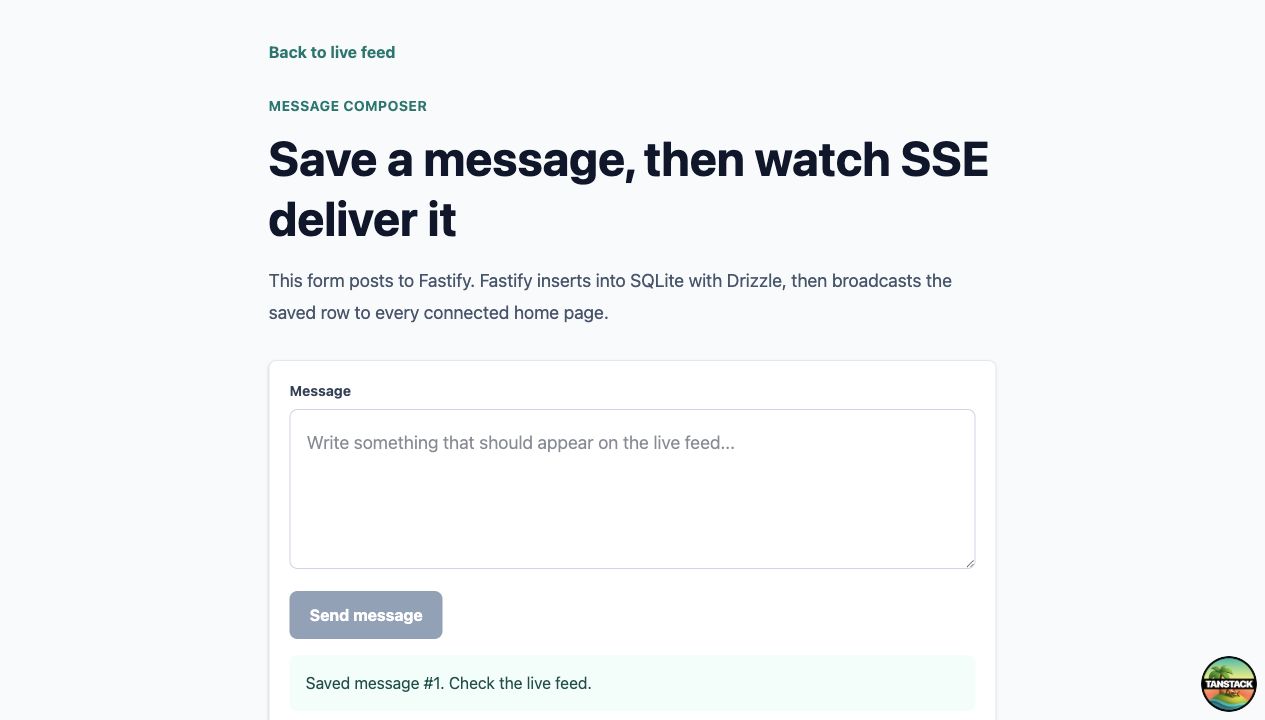
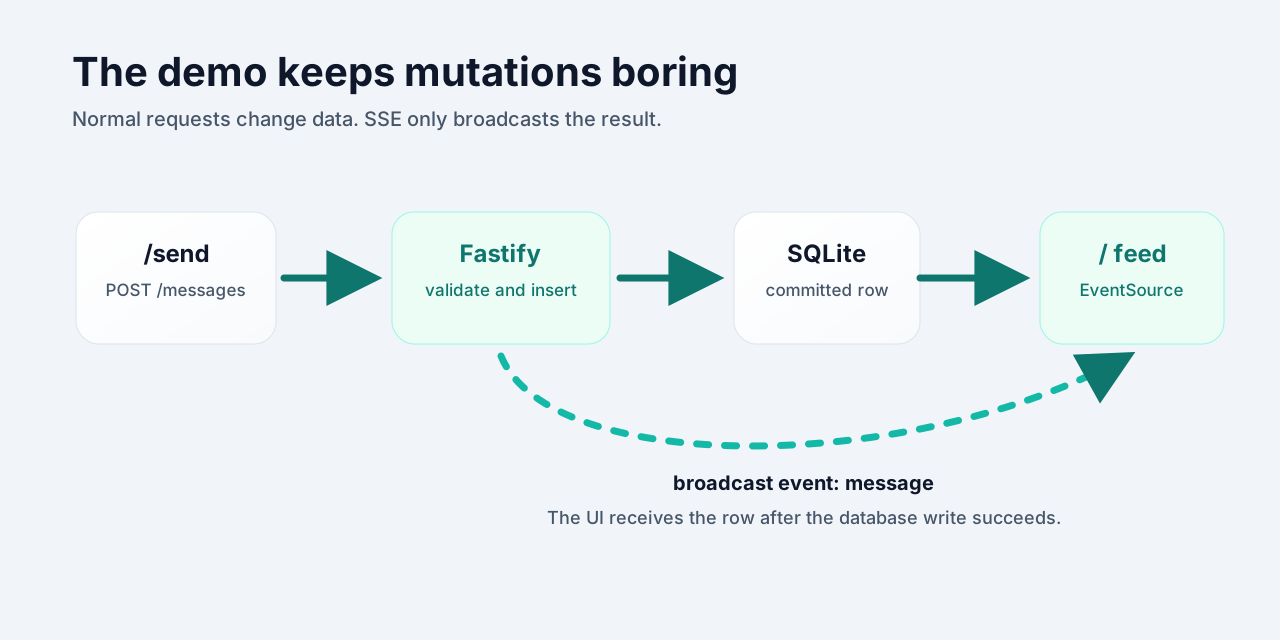
Here is the important detail: submitting the form is not an SSE operation. It is a normal HTTP request.
const response = await fetch("http://localhost:4000/messages", {
  method: "POST",
  headers: {
    "Content-Type": "application/json",
  },
  body: JSON.stringify({ body }),
});
The server validates the message, inserts it into SQLite, then broadcasts the committed row to every connected feed.
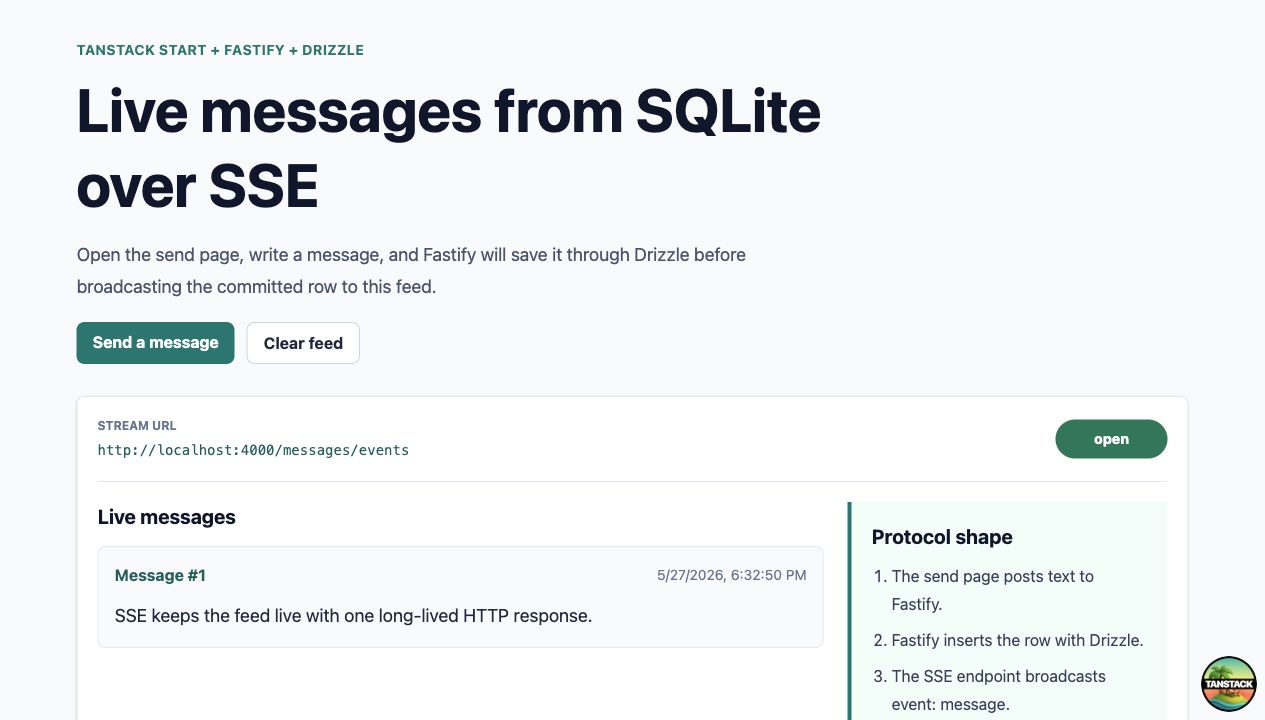
This separation is the trick:
- Use normal HTTP requests for commands.
- Use SSE for server-to-browser updates.
You get a realtime UI without turning every interaction into socket traffic.
The Client Is Almost Boring
In the demo, the home page opens one EventSource connection:
useEffect(() => {
  const source = new EventSource("http://localhost:4000/messages/events");

  const upsert = (rawData: string) => {
    const message = JSON.parse(rawData) as Message;

    setMessages((current) =>
      [message, ...current.filter((item) => item.id !== message.id)].slice(
        0,
        50,
      ),
    );
  };

  source.addEventListener("open", () => setStatus("open"));
  source.addEventListener("error", () => setStatus("closed"));
  source.addEventListener("message", (event) => {
    upsert(event.data);
  });
  source.addEventListener("clear", () => {
    setMessages([]);
  });

  return () => {
    source.close();
    setStatus("closed");
  };
}, []);
There is no socket library here. No protocol negotiation in application code. No “connected but authenticated?” state machine. No custom reconnect loop.
The browser does the boring browser part.
The app still needs normal frontend discipline, of course. You should close the connection when the component unmounts. You should handle invalid payloads in a real app. You should think about auth, rate limits, and how many streams a user can open. But the transport itself is tiny.
The Server Is Just Writing Text
On the Fastify side, the SSE endpoint is also straightforward:
app.get("/messages/events", async (request, reply) => {
  reply.raw.writeHead(200, {
    "Content-Type": "text/event-stream",
    "Cache-Control": "no-cache, no-transform",
    Connection: "keep-alive",
    "Access-Control-Allow-Origin": "http://localhost:3000",
  });

  const clientId = nextClientId++;

  const client = {
    id: clientId,
    send(event: string, payload: unknown) {
      reply.raw.write(`id: ${Date.now()}\n`);
      reply.raw.write(`event: ${event}\n`);
      reply.raw.write(`data: ${JSON.stringify(payload)}\n\n`);
    },
  };

  clients.set(clientId, client);

  request.raw.on("close", () => {
    clients.delete(clientId);
  });
});
Then broadcasting is just a loop over connected clients:
function broadcast(event: string, payload: Message | { clearedAt: string }) {
  for (const client of clients.values()) {
    client.send(event, payload);
  }
}
That is enough for a single-process demo.
In production, if you run multiple API instances, you still need a fan-out layer so every instance can broadcast the same event. That might be Redis Pub/Sub, Postgres LISTEN/NOTIFY, NATS, a queue, or whatever already fits your system.
But notice what you did not add:
- You did not replace HTTP with a custom socket protocol.
- You did not need a special WebSocket gateway.
- You did not need client-side socket lifecycle code.
- You did not need to make every mutation travel through the realtime channel.
You kept the architecture close to regular web development.
Why WebSockets Feel Simple at First
WebSockets are seductive because the local demo looks clean:
const socket = new WebSocket("ws://localhost:4000");

socket.onmessage = (event) => {
  console.log(event.data);
};

socket.send(JSON.stringify({ type: "message:create", body }));
That is not a lot of code.
The complexity starts later, when the feature becomes part of a real product.
You usually need to answer questions like:
- What message types exist?
- What schema validates each message?
- What happens when the client sends an unknown command?
- How does the socket authenticate?
- What happens when the user’s session expires while the socket is still open?
- How do you reconnect without duplicating messages?
- How do you know which messages were delivered?
- How do you resume after a tab sleeps?
- How do you broadcast across multiple backend instances?
- Does your load balancer support upgrades correctly?
- Do you need sticky sessions?
- How do you observe socket connection counts and failures?
None of these problems are impossible. Mature teams solve them every day.
The question is whether your feature needs that much machinery.
SSE vs WebSockets
Here is the decision in practical terms:
| Question | SSE | WebSockets |
|---|---|---|
| Direction | Server to browser | Browser to server and server to browser |
| Browser API | Built-in EventSource |
Built-in WebSocket, often wrapped by a library |
| Request shape | Normal long-lived HTTP GET |
HTTP upgrade into a socket |
| Message format | Text frames with event: and data: |
Whatever protocol you design |
| Reconnect | Built into the browser | You implement it or use a library |
| Client commands | Use normal fetch requests |
Usually sent through the socket |
| Best fit | Feeds, notifications, logs, progress, AI streaming, dashboards | Collaboration, games, terminals, low-latency two-way sessions |
| Infrastructure | Often works with standard HTTP infrastructure | More sensitive to proxies, gateways, sticky sessions, and fan-out |
My rule of thumb:
If the browser mostly listens, start with SSE. If both sides need to talk continuously over the same low-latency channel, reach for WebSockets.
What SSE Is Great For
SSE is a strong fit for features like:
- Notification centers.
- Activity feeds.
- Build or deployment progress.
- Long-running job status.
- AI response streaming.
- Admin dashboards.
- Live metrics.
- Log tailing.
- Payment or onboarding status updates.
- “Your report is ready” events.
In all of those cases, the user might click buttons or submit forms, but those actions can remain normal HTTP requests. The live channel is only responsible for telling the browser what changed.
That is exactly what the demo does.
The /send page posts text to Fastify. Fastify inserts the row with Drizzle. Only after SQLite accepts the write does the server broadcast:
event: message
data: {"id":1,"body":"SSE keeps the feed live","createdAt":"..."}
The live feed receives the event and updates local React state.
No socket command bus required.
The Trade-Offs
SSE is simpler, but it is not magic.
There are real constraints:
- It is one-way. The server sends; the browser listens.
- Native
EventSourcesends aGETrequest, so you do not attach a JSON body. - Native
EventSourcedoes not let you set arbitrary request headers. - If you need auth, cookies are usually the simplest option. Signed query tokens can work too, but treat them carefully.
- Under HTTP/1.1, many open tabs can run into browser per-origin connection limits. HTTP/2 helps because streams can share one connection.
- If you deploy behind a proxy, make sure it does not buffer the response.
- Long-lived connections still consume resources, so cleanup matters.
That list is much smaller than the WebSocket list for many product features, but it still deserves attention.
The most common production bug is response buffering. SSE depends on the server flushing events as they happen. If a proxy waits and buffers chunks, your “realtime” stream turns into delayed batch delivery. That is why the demo sends:
"Cache-Control": "no-cache, no-transform"You may also need proxy-specific settings depending on where you deploy.
A Better Default
I do not think the lesson is “never use WebSockets.”
The lesson is that “realtime” is not one architecture. There is a big difference between these two requirements:
- “The browser needs to know when the server has new data.”
- “The browser and server need a continuous two-way session.”
SSE is excellent for the first one.
It lets you build live interfaces while keeping the rest of your app understandable:
- Forms stay as forms.
- Mutations stay as
POST,PATCH, andDELETE. - Caching and auth stay close to HTTP.
- The live channel stays focused on events.
That is why I like it as a default. It is not flashy, but it removes a lot of accidental infrastructure.
When WebSockets are the right tool, use them confidently. But when the browser only needs to listen, do not build a socket system just to push a few events.
You probably do not need WebSockets.