What Backend Developers Should Know About SQL
A visual guide to query order, joins, aggregation, NULL, transactions, and the SQL hidden behind an ORM.
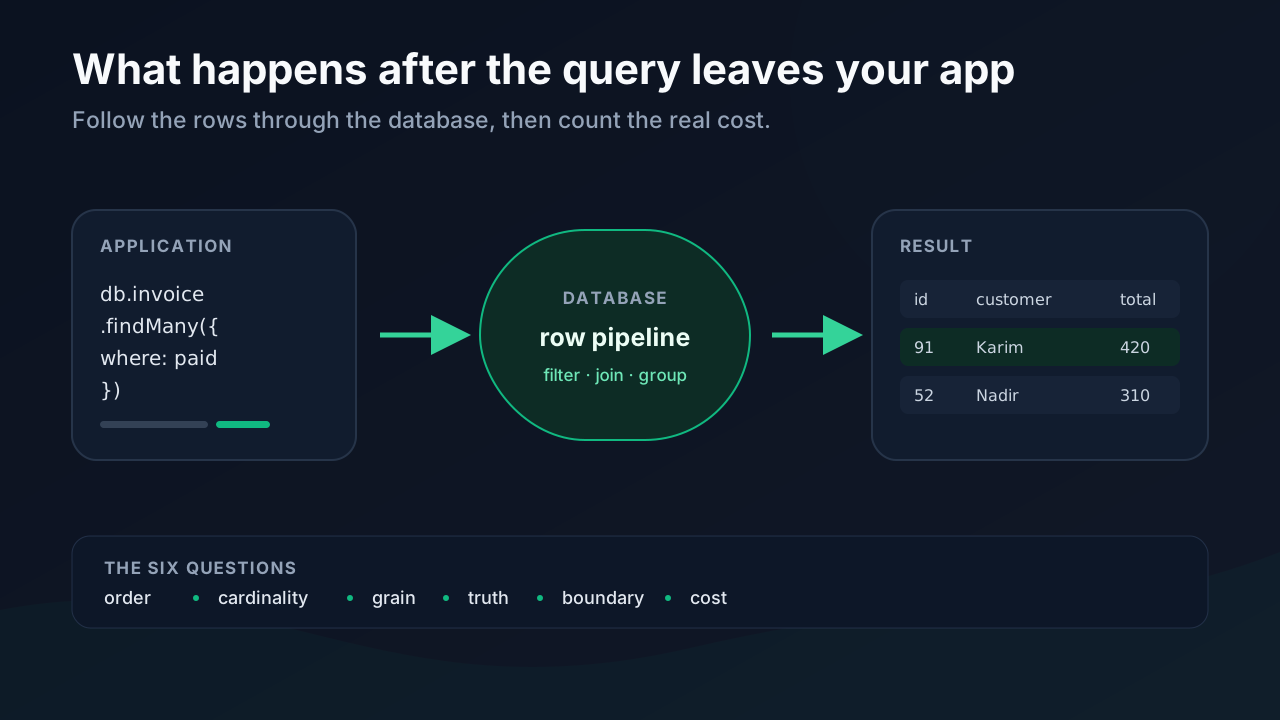
Most backend code treats a query like a string with a result attached. We write it, hand it to a driver or ORM, and get objects back.
The database sees something very different. It sees sets of rows moving through a pipeline. Some steps remove rows. Others multiply them, collapse them, lock them, or quietly turn a clear true or false into an awkward third answer: unknown.
That gap matters. A query can be correct on twelve rows and painfully wrong on twelve million. An innocent relationship inside a loop can turn one request into 101 database round trips. A join can double a total without changing a single stored value.
You do not need to memorize the SQL standard to avoid these problems. You need a few reliable pictures in your head.
The examples below use PostgreSQL syntax. The underlying ideas apply to relational databases generally, but details such as RETURNING, ON CONFLICT, parameter placeholders, and execution-plan commands vary between systems.
1. Read a Query in Logical Order
SQL is written for humans, not in execution order. The statement begins with SELECT, but the selected expressions are evaluated near the end of the logical pipeline.
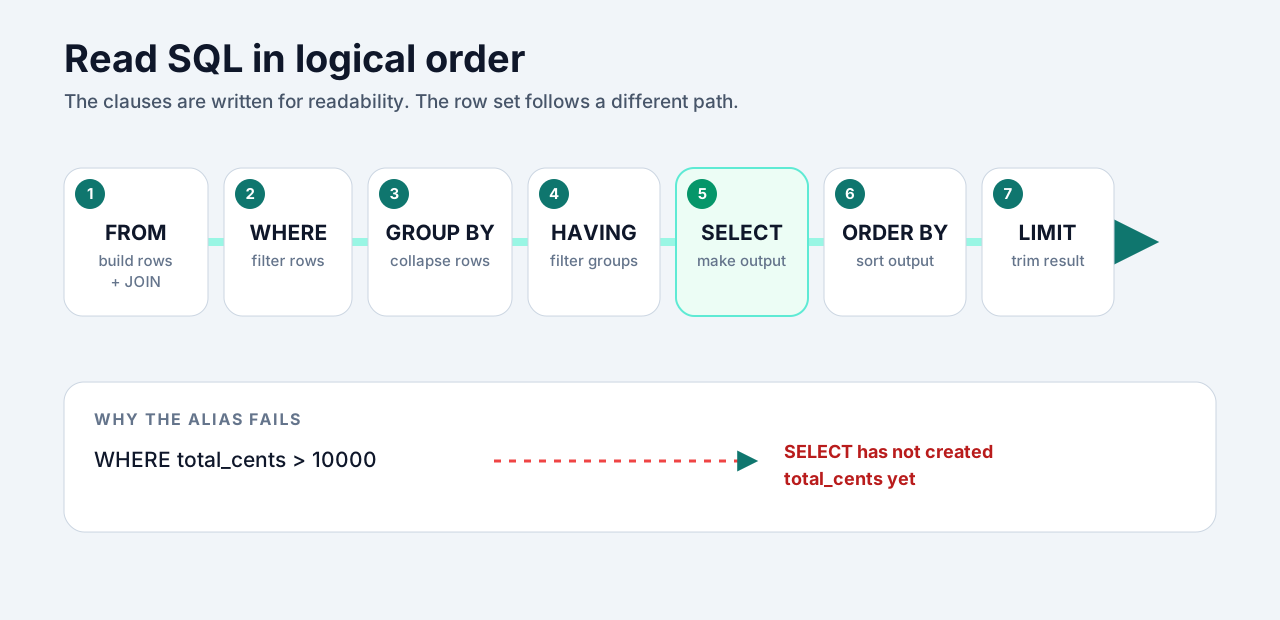
Take a report that shows customers with more than three paid invoices:
SELECT
  c.id,
  c.name,
  SUM(i.total_cents) AS lifetime_value
FROM customers AS c
JOIN invoices AS i ON i.customer_id = c.id
WHERE i.status = 'paid'
GROUP BY c.id, c.name
HAVING COUNT(*) > 3
ORDER BY lifetime_value DESC
LIMIT 20;
Read it like this:
- Build a row set from
customersandinvoices. - Remove invoices that are not paid.
- Collapse the remaining rows into one group per customer.
- Remove groups with three invoices or fewer.
- Calculate the columns in
SELECT. - Sort the result and keep twenty rows.
This explains a common error:
SELECT price_cents * quantity AS total_cents
FROM line_items
WHERE total_cents > 10000;
WHERE cannot see total_cents because that alias does not exist yet. Put the calculation in a subquery or CTE, then filter the result:
WITH priced_items AS (
  SELECT *, price_cents * quantity AS total_cents
  FROM line_items
)
SELECT *
FROM priced_items
WHERE total_cents > 10000;
When a query behaves strangely, stop reading it top to bottom. Follow the row set through the pipeline instead.
2. A Join Changes Cardinality
Developers often describe a join as “attaching” data. That wording is convenient, but it hides the dangerous part: a join produces one output row for every matching pair.
One customer with two invoices becomes two rows after joining invoices. Join three support tickets as well and you do not get five rows. You can get six: every invoice paired with every ticket.
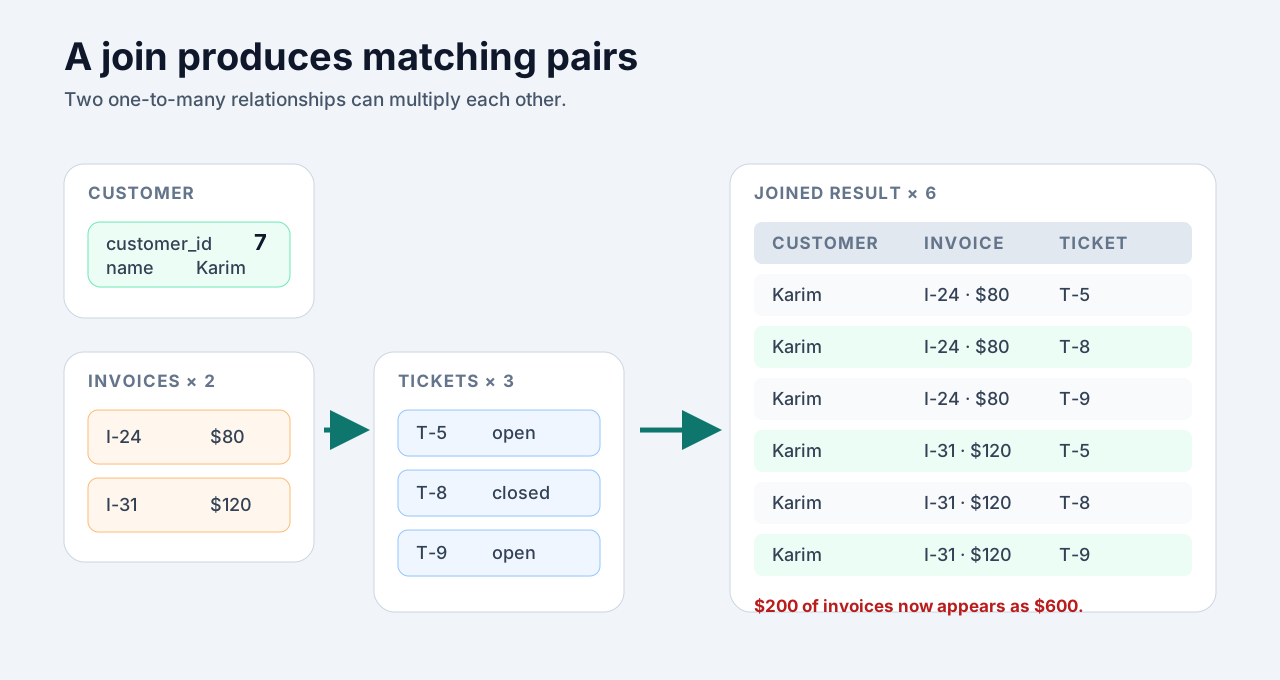
This is how totals get inflated:
SELECT
  c.id,
  SUM(i.total_cents) AS revenue,
  COUNT(t.id) AS ticket_count
FROM customers AS c
JOIN invoices AS i ON i.customer_id = c.id
JOIN tickets AS t ON t.customer_id = c.id
GROUP BY c.id;
For a customer with two invoices and three tickets, each invoice appears three times. The database is doing exactly what the query asks.
The safe pattern is to aggregate each many-side to the grain you want, then join those smaller results:
WITH invoice_totals AS (
  SELECT customer_id, SUM(total_cents) AS revenue
  FROM invoices
  GROUP BY customer_id
),
ticket_totals AS (
  SELECT customer_id, COUNT(*) AS ticket_count
  FROM tickets
  GROUP BY customer_id
)
SELECT
  c.id,
  COALESCE(i.revenue, 0) AS revenue,
  COALESCE(t.ticket_count, 0) AS ticket_count
FROM customers AS c
LEFT JOIN invoice_totals AS i ON i.customer_id = c.id
LEFT JOIN ticket_totals AS t ON t.customer_id = c.id;
Write down the grain before joining: what does one source row represent, and what will one result row represent? If those answers are fuzzy, the query is not ready.
3. GROUP BY Changes the Grain; a Window Keeps It
Aggregation changes the shape of the result. GROUP BY collapses detail rows. Once five invoices become one customer summary, the five original rows are gone from that result.
A window function calculates across related rows without collapsing them. You keep the invoices and gain a useful value beside each one.
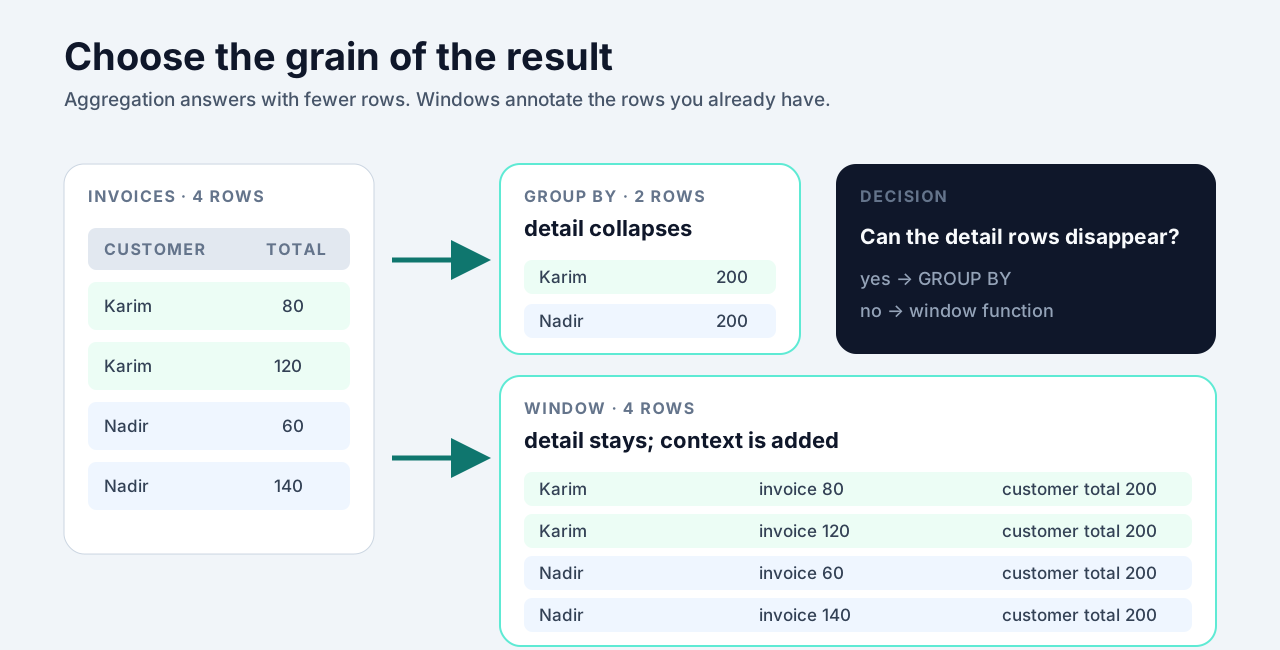
Use GROUP BY when the output should contain one row per customer:
SELECT customer_id, SUM(total_cents) AS lifetime_value
FROM invoices
GROUP BY customer_id;
Use a window when the output should still contain one row per invoice:
SELECT
  id,
  customer_id,
  total_cents,
  SUM(total_cents) OVER (
    PARTITION BY customer_id
  ) AS customer_lifetime_value
FROM invoices;
Windows are especially useful for ranks, running totals, moving averages, and comparisons with the previous row:
SELECT
  account_id,
  created_at,
  balance_cents,
  balance_cents - LAG(balance_cents) OVER (
    PARTITION BY account_id
    ORDER BY created_at
  ) AS change_cents
FROM daily_balances;
The useful question is not “Should I use a window function?” It is “Am I allowed to lose the original rows?” If the answer is no, a window is usually the better tool.
4. Existence Is Safer Than Membership
NULL does not mean empty, zero, or missing text. It means the database does not know the value. SQL therefore has three-valued logic: true, false, and unknown.
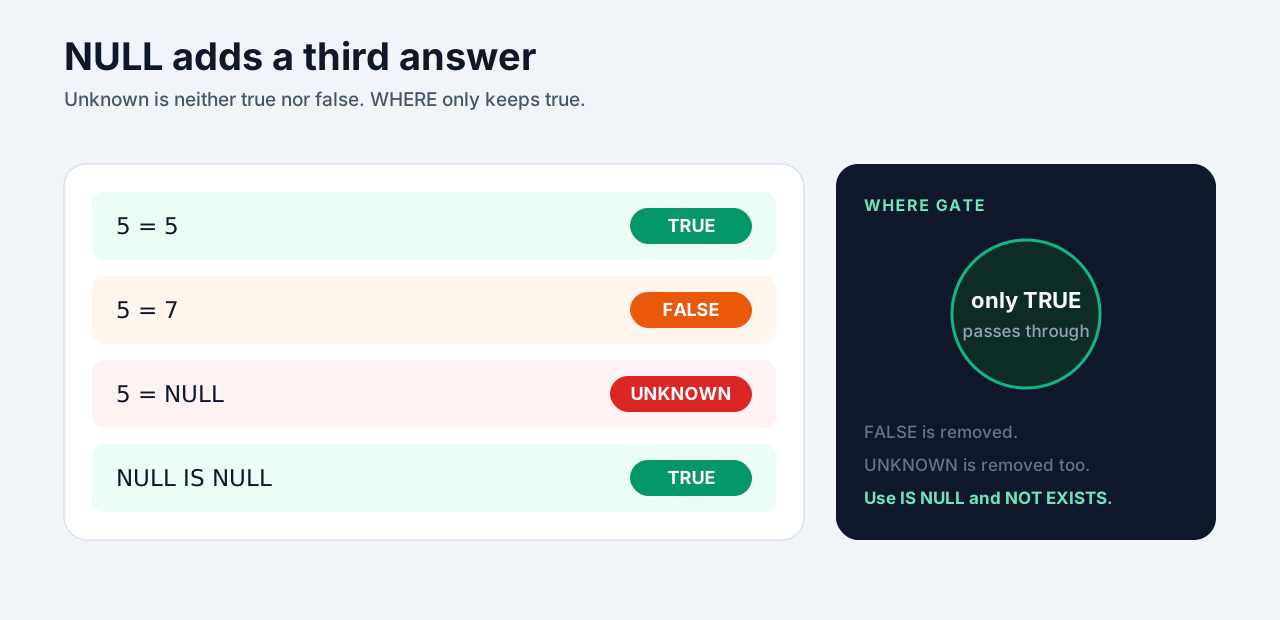
That is why this is never true:
WHERE deleted_at = NULLThe correct check is:
WHERE deleted_at IS NULLThe nastier version hides inside NOT IN. Suppose archived_categories.category_id contains 3, 7, and NULL:
SELECT *
FROM products
WHERE category_id NOT IN (
  SELECT category_id FROM archived_categories
);
For a product in category 5, SQL effectively asks whether 5 differs from 3, 7, and an unknown value. The final answer is unknown, so the row is filtered out. Depending on the data, the query can return nothing.
Express the real question directly: “Does a matching row exist?”
SELECT p.*
FROM products AS p
WHERE NOT EXISTS (
  SELECT 1
  FROM archived_categories AS a
  WHERE a.category_id = p.category_id
);
EXISTS can stop at the first match. It also communicates intent better than fetching values merely to test membership. When you only care whether a relationship exists, say so.
5. Writes Need a Boundary
A read can be stale and merely look odd. A half-finished write can corrupt the meaning of your data.
Imagine moving credit between two wallets. Deducting from one wallet and adding to the other are not two independent updates. Together, they are one business operation.
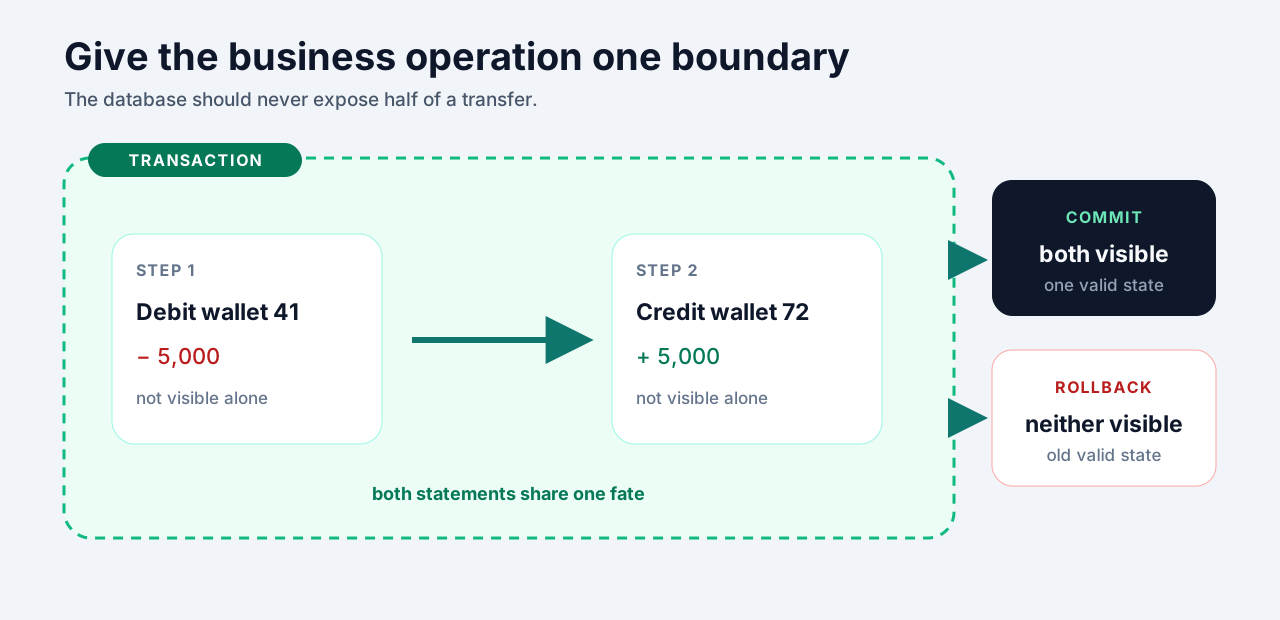
BEGIN;

UPDATE wallets
SET balance_cents = balance_cents - 5000
WHERE id = 41;

UPDATE wallets
SET balance_cents = balance_cents + 5000
WHERE id = 72;

COMMIT;
The transaction gives the operation an all-or-nothing boundary, but it does not automatically make every business rule safe. Two requests can still race. Put invariants close to the data:
UPDATE inventory
SET quantity = quantity - 1
WHERE sku = 'KEYBOARD-75'
  AND quantity >= 1
RETURNING quantity;
If no row comes back, the item was unavailable. The check and the write happen in one statement, which removes the gap where another request could take the last item.
For retryable work, pair transactions with idempotency. A unique key plus an upsert is often enough:
INSERT INTO processed_events (event_id, processed_at)
VALUES ($1, NOW())
ON CONFLICT (event_id) DO NOTHING
RETURNING event_id;
A transaction protects a unit of work. A constraint protects an invariant. An upsert makes a repeated request predictable. They solve related problems, but they are not interchangeable.
6. Your ORM Hides Syntax, Not Cost
An ORM can make data access pleasant. It cannot change the price of network round trips, duplicated rows, wide payloads, or missing indexes.
The classic example is N+1. Load fifty projects, then lazily touch project.owner in a loop. The code reads like one operation. The database receives fifty-one queries.
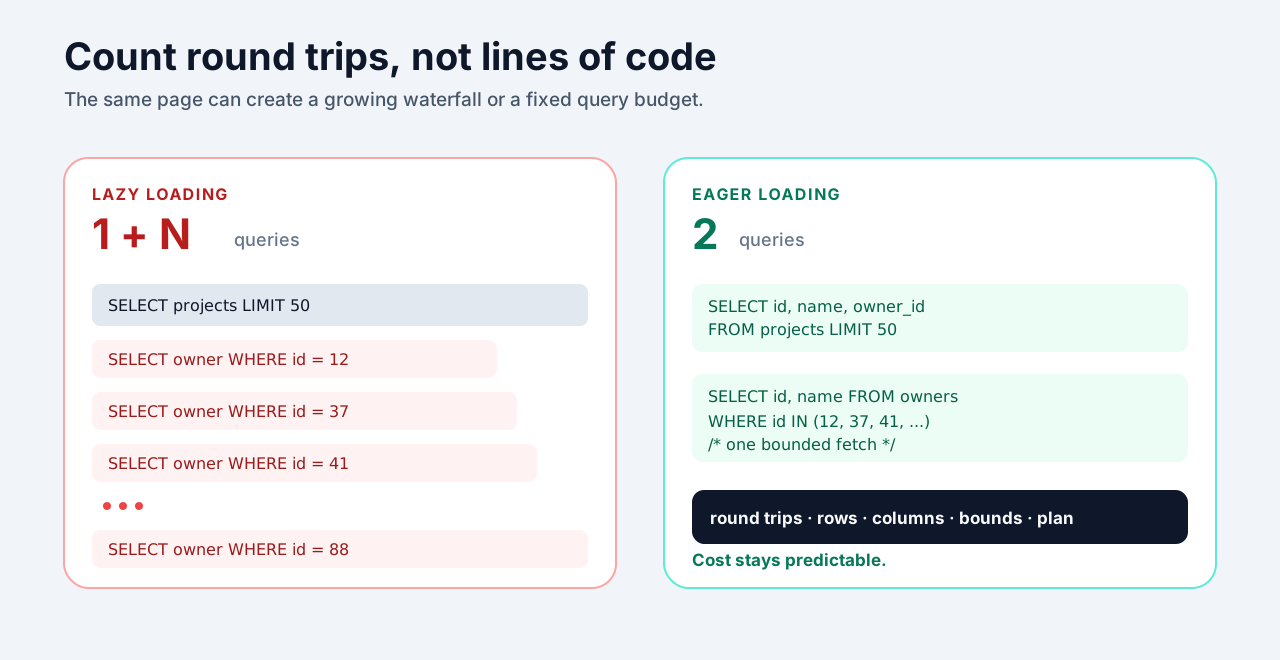
The important number is not how many lines of application code you wrote. It is the work that crossed the database boundary.
A small query budget makes endpoint reviews concrete:
- Round trips: does the query count grow with the result count?
- Rows: is the database returning thousands of records so the app can call
.length? - Columns: are large JSON or text fields being pulled into a title-only list?
- Bounds: does every feed, search, and admin table have a real limit?
- Plan: does the production-shaped query use the index you expect?
You do not have to abandon the ORM. Turn on query logging in development, inspect the generated SQL, and use EXPLAIN (ANALYZE, BUFFERS) when performance matters. Eager-load known relationships. Ask the database to count. Select the columns the response actually uses.
The abstraction is doing its job when you can drop below it whenever the cost becomes unclear.
A Better Way to Review SQL
Syntax is the easy part. Before shipping a query, walk through these six checks:
- Order: which rows exist at each stage of the logical pipeline?
- Cardinality: can a join multiply those rows?
- Grain: should aggregation collapse the detail or preserve it?
- Truth: can
NULLturn the predicate intounknown? - Boundary: what must succeed, fail, or retry as one operation?
- Cost: what SQL and how many round trips will the ORM actually produce?
Once those pictures become automatic, SQL stops feeling like a bag of clauses. You can predict the result before running the query. More importantly, you can spot the query that will become a production incident while it is still sitting in a pull request.